
Enhancements to Listings Management Functionalities
Please note that the below enhancements on AgentNet will now be effective from Wednesday, 6th September, 2017.
We would like to inform you of the following key enhancements around listings management, effective 30th August, 2017 on AgentNet Web and coming up in September 2017 for AgentNet Mobile App.
I. Introduction of “Resume” and “Reactivate” to Past Listings:
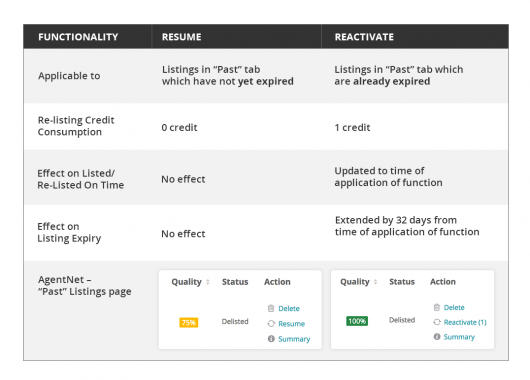
To enhance your listing management experience, two new functionalities have been introduced to Past Listings – “Resume” and “Reactivate”. These new functionalities have replaced “Activate”, and can be applied from Listing Detail page and Listing Management page of Past Listings.
Please refer to the below table for further details.
II. Indication of Deductible Number of Re-listing Credits for Specific Actions:
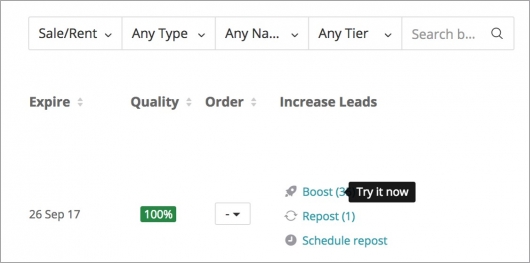
To provide clarity to agents when taking repost/resume/reactivate actions to their listings, we have introduced an indication on the number of re-listing credits which will be deducted in correspondence to the action to be taken, for each listing.
The numerical figure of re-listing credits to be deducted will be indicated in brackets as shown in the below screenshot for your reference for AgentNet Web:
For any questions please refer to our FAQs below. Alternatively, contact your Account Manager or call our Customer Care at 6238 5971.
______________________________________________________________________________________
Frequently Asked Questions (FAQs)
1. Who is impacted by these implementations?
All agent and corporate account users will be impacted by these implementations. These implementations will not affect overseas or developer (new homes) listings.
2. When will these implementations take effect?
AgentNet Web implementation will take place on 30th August 2017 and AgentNet App implementation will take place in September 2017.
3. When can I “Resume” a listing?
Agents can Resume a listing when it has been delisted but has not yet expired (eg. the end date has not yet passed, but the agent has delisted it, so it will be in the “Past” tab).
4. When can I “Reactivate” a listing?
Agents can Reactive a listing when it has expired (eg. the end date has passed; it will be in the “Past” tab).
5. How much does it cost to “Resume” a listing?
It is free to resume a listing that has been delisted. Resume will be available until the listing end date passes. Note that Resume does not extend the listing.
6. How much does it cost to “Reactivate” a listing?
It costs 1 credit to Reactivate a listing. Reactivate is available when the listing has expired; once the listing end date has passed.
7. How can I “Resume” or “Reactivate” a listing?
The Resume or Reactivate buttons are available in the “Past” listings tab, where “Repost” previously appeared. Note that only one or the other will be available, dependent upon whether the listing has passed the end date (aka. "expired”) yet.
8. What has changed about Repost?
Repost is no longer available for Past Listings. For Past Listings Repost has been replaced by “Resume” and “Reactivate”.
9. How will I know how many credits they will be charged for various listings and features?
To provide clarity to agents when taking repost/resume/reactivate actions to their listings, we have introduced an indication on the number of re-listing credits which will be deducted in correspondence to the action to be taken including Boost, for each listing. The numerical figure of re-listing credits to be deducted will be indicated in brackets as shown in the screenshots in the main announcement above for your reference.
We also aggregate all of the credit charges in the pop-up confirmation that appears before deducting any credits. An agent needs to accept that before their action is confirmed. The pop-up does not itemize the credit deductions, it just shows a total to be deducted.
10. What should I do if I want to repost a listing (with ranking bump) for a delisted/Past listing that is not yet expired?
You can follow either of the two options:
• Resume the listing for free, then repost the listing (cost of the repost may vary).
• Wait until the listing end date has passed and then Reactivate the listing (cost is 1 Re-listing Credit).
11. What happens to Auto-Repost campaigns?
These campaigns continue to run, and the system will deduct the appropriate amount of credits based on the state of the listing at a scheduled time. So if a listing is a For Sale Boosted listing when the auto-repost is scheduled, the system will deduct 7 credits upon every scheduled repost.
______________________________________________________________________________________