
Engage Property Seekers Effortlessly with High-Quality AI-Generated Videos
Dear Agent Partner,
Based on agent research and feedback, we understand that uploading video in listing gallery is one of the most tedious steps during the listing creation process. To help agents be more efficient and seamless in creating high-quality property videos, PropertyGuru has launched a new video generation tool called the AI Video.
What is the AI Video tool?
AI Video is a powerful video generation tool that leverages artificial intelligence and machine learning to automate the creation of property videos. It analyses a listing’s data, such as its photos and description to generate high-quality, compelling videos to engage property seekers.
Why is it useful for agents?
Adding a property video to your listing increases your listing’s quality score and helps your listing engage with property seekers more effectively. Besides highlighting the key features of a property, which includes listing photos and location map, it is also enhanced with audio-visual elements such as music, narration, and subtitles to create a high-quality property explainer video.
Agents can effortlessly create a high-quality, compelling property video with just a few clicks, helping you to be more efficient and significantly reducing the time, effort, and investment to produce a professional video. Your agency and name will also be displayed at the end of the video, allowing you to promote your personal brand.
Lastly, you can easily share your listing video by posting on your social media accounts, such as Facebook, Twitter, and WhatsApp, or by generating a unique video link or downloading the video.
Is the AI Video tool available for all listings?
As part of this beta launch, it is available for new Condo listings – for Sale and Whole unit rental created on PropertyGuru.com.sg from 27 March 2024 onwards.
NOTE: If you’re using the AgentNet mobile app, please ensure it’s updated to the latest version.
Is it free to use the AI Video tool?
Yes, all eligible PropertyGuru agents can use it for free.
Can the video be displayed on my PropertyGuru listing?
Yes. Once the video is generated, you can add the video to your listing gallery, allowing it to be displayed on your PropertyGuru listing.
Where can I access the AI Video tool?
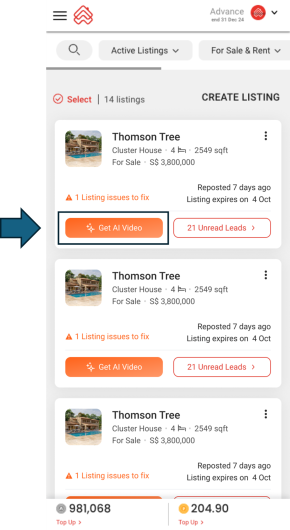
The AI Video tool is accessible on each listing, under the Listings tab on AgentNet website and mobile app.
NOTE: The ‘Get AI Video’ button will only be available after you have posted a new listing.
For more information, you may visit our Help article. We hope this AI Video tool will come in handy for you!
We would like to hear your suggestions on how we can improve this tool to better serve your needs. Feel free to share your feedback with any of your agency’s dedicated Account Managers. Thank you!
Being a better partner for you,
PropertyGuru Team