
Announcement: User Interface Enhancements to AgentNet “My Listings” Page
To bring you better user experience, we will be applying enhancements to AgentNet continuously!
On 14 Dec, 2016, web version of AgentNet “My Listings” page takes on a new look, with key enhancements on the navigation bar, your profile and listing management sections. The aim is to help you manage your listings more efficiently and present a clutter-free interface for easier navigation.

AgentNet “Listings” page new look and enhancements, effective 14 Dec, 2016.
Details of All Changes
Navigation Bar
Note: Changes to the navigation bar is applicable to all AgentNet pages.

- “My Listings” page will be renamed as “Listings”, this applies to “Bookings” and “Messages” too
- “Marketplace”, “AskGuru” and “Floor Plans” will be filed under “More”
- Your PropertyGuru account expiry date will be displayed on top right corner – NEW INFO!
Profile & Credits Management Section
- Profile and credit balance info will be consolidated and available, when clicked on your name on the top right corner in the navigation bar
- “Buy Credit” button in navigation bar will be removed. To top up your re-listing credits, simply contact your Account Manager
Listing Management Section (applies to Active, Draft, Past and Featured tabs)
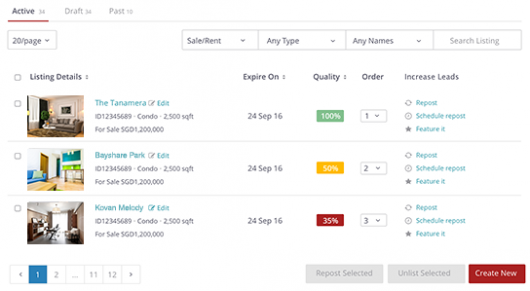
- Filter functions “All Property Types” and “Property Name” will be renamed as “Any Types” and “Any Names”
- Select all listings in a single click – NEW FEATURE!
- Display of cover photo for easy identification of listing – NEW FEATURE!
- Sort your listings by alphabetical order, expiry date, quality score and more – NEW FEATURE!
- "Edit” function is shifted next to your listing title
- “Repost” and “Schedule Repost” functions can be found under “Increase Leads” column on the right
- “Unlist” function for each listing will be consolidated as one button “Unlist Selected” at the bottom right
- “Share” and “Feature it” functions will be removed
For further information, please refer to FAQ listed below.
If you require any assistance or have further queries, please contact your Account Manager or call our Customer Care hotline at 62385971.
Frequently Asked Questions (FAQ)
Why is PropertyGuru making these changes to the AgentNet “My Listing” page?
The aim is to help you manage your listings more efficiently and present a neater interface for ease of use.
When would the changes be effective?
14 Dec, 2016
Would other pages be changed too?
Almost all the changes are applicable to “My Listing” page, except for the navigation bar which is applied to all AgentNet pages.
Why is the “Buy Credit” button removed? / I can’t find “Buy Credit” button
We do not yet support online credits top-up feature, as such, will be removing this button for now. To top-up your credits, you can call your Account Manager.